Responsive Login Page Template with HTML & CSS
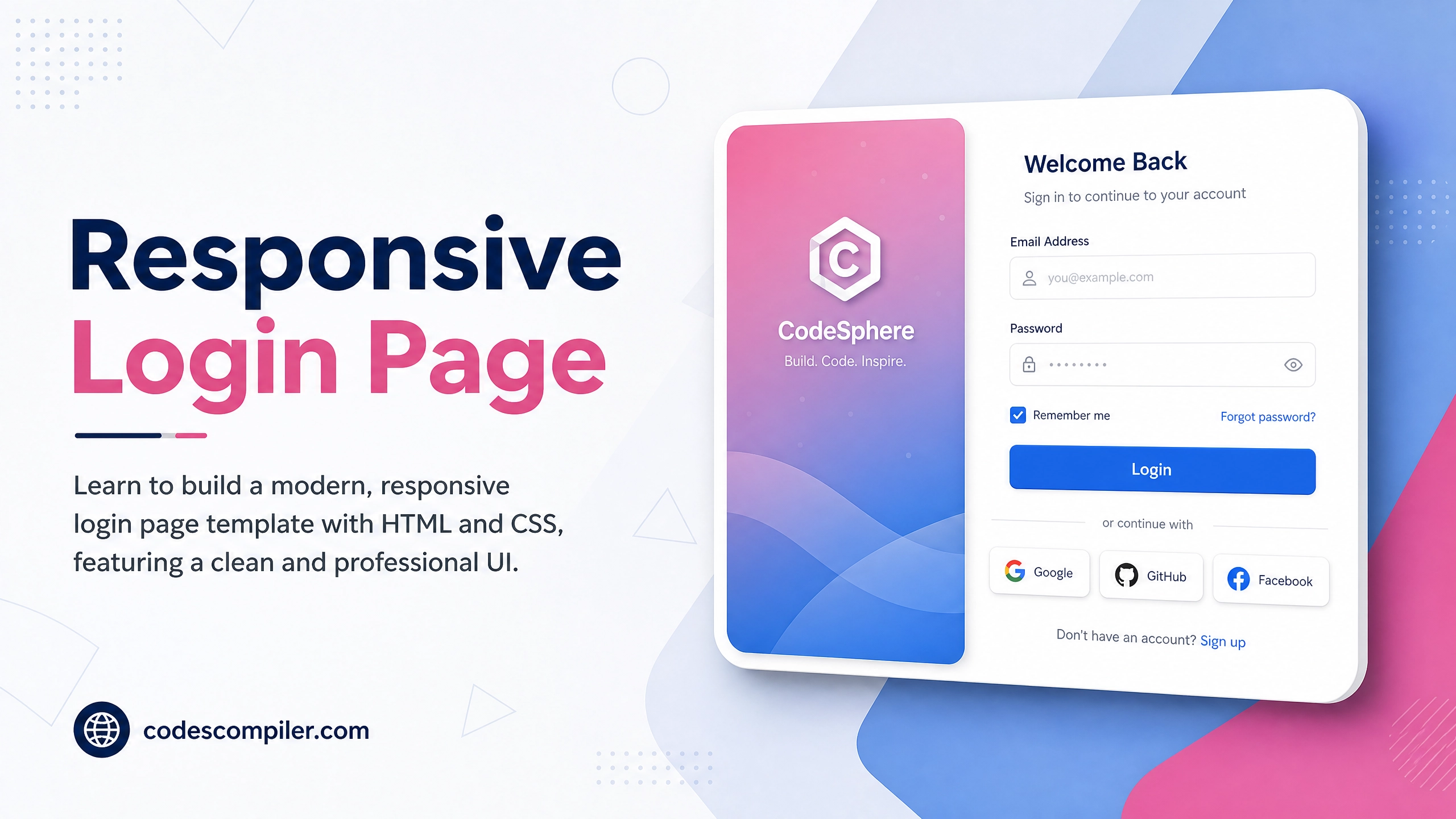
Learn responsive login page template with with this comprehensive guide containing source code and step-by-step instructions.
Welcome to this tutorial on Responsive Login Page Template with HTML & CSS. This is an automatically generated post based on popular examples to help you learn and implement this concept.
HTML Structure
Here is the basic HTML structure for this project:
HTML CODE
<main class="login-wrapper">
  <div class="login-card">
    <div class="brand-section">
      <div class="brand-content">
        <div class="logo">
          <svg viewBox="0 0 24 24" width="40" height="40" stroke="currentColor" stroke-width="2" fill="none" stroke-linecap="round" stroke-linejoin="round"><polygon points="12 2 2 7 12 12 22 7 12 2"></polygon><polyline points="2 17 12 22 22 17"></polyline><polyline points="2 12 12 17 22 12"></polyline></svg>
          <span>Nexus</span>
        </div>
        <h1 class="brand-title">Welcome back to Nexus</h1>
        <p class="brand-desc">The ultimate platform for creative professionals and innovators to build the future.</p>
      </div>
      <div class="decorative-circles">
        <div class="circle circle-1"></div>
        <div class="circle circle-2"></div>
      </div>
    </div>

    <div class="form-section">
      <div class="form-header">
        <h2>Sign In</h2>
        <p>Please enter your credentials.</p>
      </div>

      <form class="login-form" action="#" onsubmit="event.preventDefault(); alert('Signed in!');">
        <div class="form-group">
          <label for="email">Email Address</label>
          <input type="email" id="email" placeholder="hello@example.com" required />
        </div>

        <div class="form-group">
          <label for="password">Password</label>
          <input type="password" id="password" placeholder="••••••••" required />
        </div>

        <div class="form-actions">
          <label class="remember-me">
            <input type="checkbox" />
            <span>Remember me</span>
          </label>
          <a href="#" class="forgot-link">Forgot password?</a>
        </div>

        <button type="submit" class="submit-btn">Sign In</button>

        <div class="social-login">
          <span class="divider">Or continue with</span>
          <div class="social-buttons">
            <button type="button" class="social-btn">
              <svg viewBox="0 0 24 24" width="20" height="20" stroke="currentColor" stroke-width="2" fill="none" stroke-linecap="round" stroke-linejoin="round"><path d="M9 19c-5 1.5-5-2.5-7-3m14 6v-3.87a3.37 3.37 0 0 0-.94-2.61c3.14-.35 6.44-1.54 6.44-7A5.44 5.44 0 0 0 20 4.77 5.07 5.07 0 0 0 19.91 1S18.73.65 16 2.48a13.38 13.38 0 0 0-7 0C6.27.65 5.09 1 5.09 1A5.07 5.07 0 0 0 5 4.77a5.44 5.44 0 0 0-1.5 3.78c0 5.42 3.3 6.61 6.44 7A3.37 3.37 0 0 0 9 18.13V22"></path></svg>
            </button>
            <button type="button" class="social-btn">
              <svg viewBox="0 0 24 24" width="20" height="20" stroke="currentColor" stroke-width="2" fill="none" stroke-linecap="round" stroke-linejoin="round"><path d="M22 12c0-5.523-4.477-10-10-10S2 6.477 2 12c0 4.991 3.657 9.128 8.438 9.878v-6.987h-2.54V12h2.54V9.797c0-2.506 1.492-3.89 3.777-3.89 1.094 0 2.238.195 2.238.195v2.46h-1.26c-1.243 0-1.63.771-1.63 1.562V12h2.773l-.443 2.89h-2.33v6.988C18.343 21.128 22 16.991 22 12z"></path></svg>
            </button>
          </div>
        </div>

        <p class="signup-prompt">
          Don't have an account? <a href="#">Sign up now</a>
        </p>
      </form>
    </div>
  </div>
</main>
CSS Styling
Style your component using the following CSS:
CSS CODE
@import url('https://fonts.googleapis.com/css2?family=Plus+Jakarta+Sans:wght@400;500;600;700&display=swap');

:root {
  --primary: #f43f5e;
  --primary-hover: #e11d48;
  --bg-color: #0f172a;
  --card-bg: #1e293b;
  --text-main: #f8fafc;
  --text-muted: #94a3b8;
  --border: #334155;
  --input-bg: #0f172a;
}

* {
  margin: 0;
  padding: 0;
  box-sizing: border-box;
}

body {
  font-family: 'Plus Jakarta Sans', sans-serif;
  background-color: var(--bg-color);
  color: var(--text-main);
  min-height: 100vh;
  display: flex;
  align-items: center;
  justify-content: center;
  padding: 20px;
  background-image:
    radial-gradient(at 0% 0%, rgba(244, 63, 94, 0.15) 0px, transparent 50%),
    radial-gradient(at 100% 100%, rgba(56, 189, 248, 0.1) 0px, transparent 50%);
}

.login-wrapper {
  width: 100%;
  max-width: 1000px;
}

.login-card {
  background: var(--card-bg);
  border-radius: 24px;
  overflow: hidden;
  display: flex;
  box-shadow: 0 25px 50px -12px rgba(0, 0, 0, 0.5);
  border: 1px solid rgba(255, 255, 255, 0.05);
}

.brand-section {
  flex: 1;
  padding: 60px 40px;
  background: linear-gradient(135deg, var(--primary), #9f1239);
  position: relative;
  overflow: hidden;
  display: flex;
  flex-direction: column;
  justify-content: center;
}

.brand-content {
  position: relative;
  z-index: 2;
}

.logo {
  display: flex;
  align-items: center;
  gap: 12px;
  font-size: 1.5rem;
  font-weight: 700;
  margin-bottom: 40px;
}

.brand-title {
  font-size: 2.8rem;
  line-height: 1.2;
  margin-bottom: 20px;
  font-weight: 700;
}

.brand-desc {
  font-size: 1.1rem;
  line-height: 1.6;
  opacity: 0.9;
}

.decorative-circles {
  position: absolute;
  top: 0;
  left: 0;
  width: 100%;
  height: 100%;
  overflow: hidden;
  z-index: 1;
  pointer-events: none;
}

.circle {
  position: absolute;
  border-radius: 50%;
  background: linear-gradient(135deg, rgba(255,255,255,0.2), rgba(255,255,255,0));
  backdrop-filter: blur(10px);
}

.circle-1 {
  width: 300px;
  height: 300px;
  top: -100px;
  right: -100px;
}

.circle-2 {
  width: 200px;
  height: 200px;
  bottom: -50px;
  left: -50px;
}

.form-section {
  flex: 1;
  padding: 60px 40px;
  display: flex;
  flex-direction: column;
  justify-content: center;
}

.form-header {
  margin-bottom: 40px;
}

.form-header h2 {
  font-size: 2rem;
  margin-bottom: 8px;
}

.form-header p {
  color: var(--text-muted);
}

.form-group {
  margin-bottom: 24px;
}

.form-group label {
  display: block;
  margin-bottom: 8px;
  font-weight: 500;
  font-size: 0.95rem;
}

.form-group input {
  width: 100%;
  padding: 14px 16px;
  background: var(--input-bg);
  border: 1px solid var(--border);
  border-radius: 12px;
  color: var(--text-main);
  font-family: inherit;
  font-size: 1rem;
  transition: all 0.3s ease;
}

.form-group input:focus {
  outline: none;
  border-color: var(--primary);
  box-shadow: 0 0 0 4px rgba(244, 63, 94, 0.1);
}

.form-actions {
  display: flex;
  justify-content: space-between;
  align-items: center;
  margin-bottom: 32px;
}

.remember-me {
  display: flex;
  align-items: center;
  gap: 8px;
  cursor: pointer;
  color: var(--text-muted);
  font-size: 0.95rem;
}

.remember-me input[type="checkbox"] {
  accent-color: var(--primary);
  width: 16px;
  height: 16px;
}

.forgot-link {
  color: var(--primary);
  text-decoration: none;
  font-weight: 600;
  font-size: 0.95rem;
}

.forgot-link:hover {
  text-decoration: underline;
}

.submit-btn {
  width: 100%;
  padding: 16px;
  background: var(--primary);
  color: white;
  border: none;
  border-radius: 12px;
  font-size: 1rem;
  font-weight: 600;
  font-family: inherit;
  cursor: pointer;
  transition: all 0.3s ease;
  margin-bottom: 32px;
}

.submit-btn:hover {
  background: var(--primary-hover);
  transform: translateY(-2px);
  box-shadow: 0 10px 20px -10px rgba(244, 63, 94, 0.5);
}

.social-login {
  text-align: center;
  margin-bottom: 32px;
}

.divider {
  display: block;
  position: relative;
  color: var(--text-muted);
  font-size: 0.9rem;
  margin-bottom: 24px;
}

.divider::before,
.divider::after {
  content: "";
  position: absolute;
  top: 50%;
  width: 25%;
  height: 1px;
  background: var(--border);
}

.divider::before { left: 10%; }
.divider::after { right: 10%; }

.social-buttons {
  display: flex;
  justify-content: center;
  gap: 16px;
}

.social-btn {
  display: flex;
  align-items: center;
  justify-content: center;
  width: 60px;
  height: 60px;
  border-radius: 12px;
  background: var(--input-bg);
  border: 1px solid var(--border);
  color: var(--text-main);
  cursor: pointer;
  transition: all 0.3s ease;
}

.social-btn:hover {
  background: var(--border);
  transform: translateY(-2px);
}

.signup-prompt {
  text-align: center;
  color: var(--text-muted);
  font-size: 0.95rem;
}

.signup-prompt a {
  color: var(--primary);
  text-decoration: none;
  font-weight: 600;
  margin-left: 4px;
}

.signup-prompt a:hover {
  text-decoration: underline;
}

@media (max-width: 860px) {
  .login-card {
    flex-direction: column;
  }

  .brand-section {
    padding: 40px;
  }

  .brand-title {
    font-size: 2.2rem;
  }

  .form-section {
    padding: 40px;
  }
}

@media (max-width: 480px) {
  .brand-section, .form-section {
    padding: 30px 20px;
  }

  .form-actions {
    flex-direction: column;
    align-items: flex-start;
    gap: 16px;
  }
}
JavaScript Logic (if applicable)
For dynamic behavior, you can use the following JavaScript snippet:
JAVASCRIPT CODE
document.addEventListener('DOMContentLoaded', () => {
  console.log('Responsive Login Template Ready!');
});
Feel free to customize this code for your own projects!