Design a Modern Glassmorphism UI with HTML & CSS
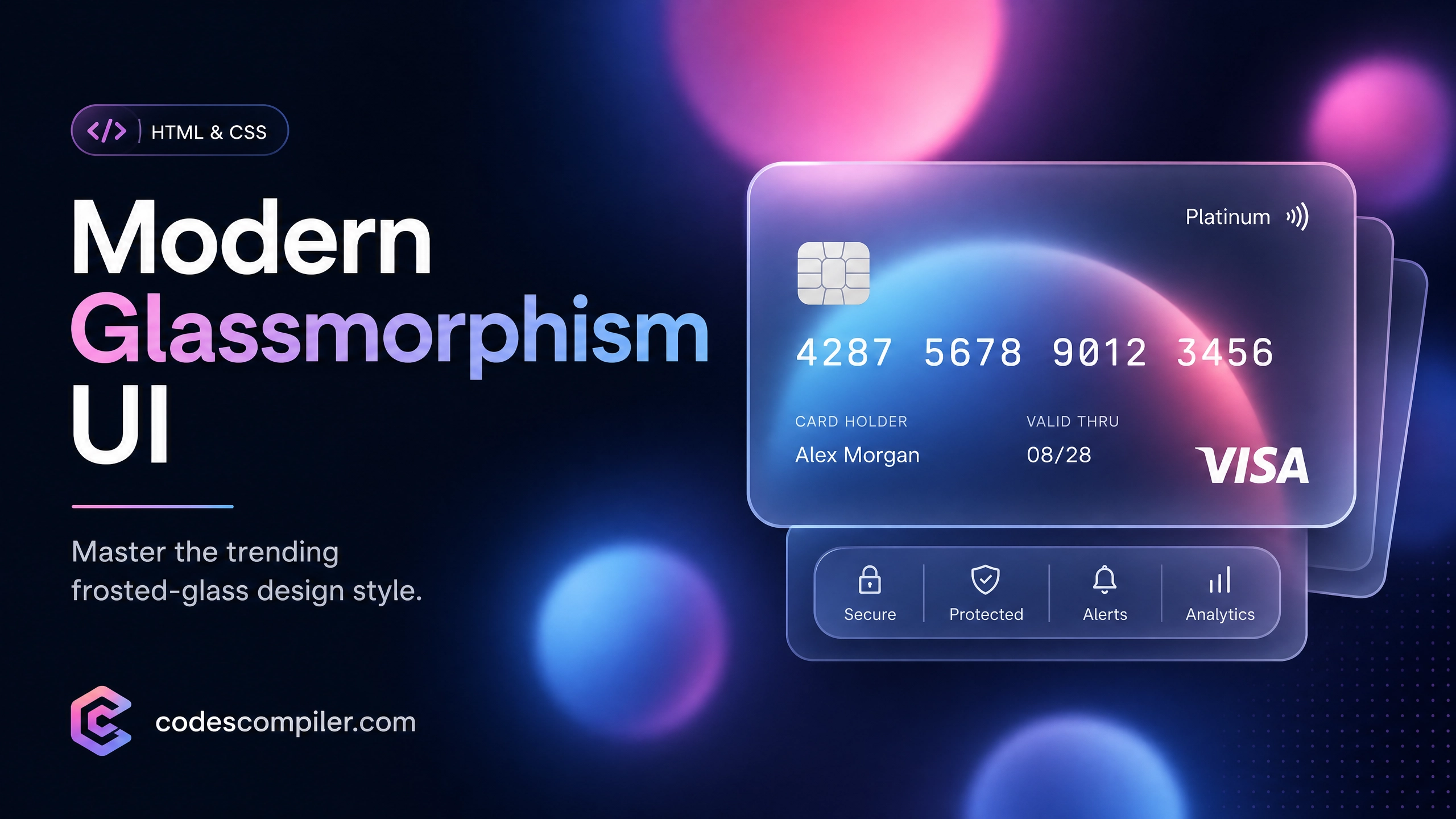
Master the trending Glassmorphism design style by creating a stunning, realistic glass credit card UI using pure HTML and CSS.
Welcome to this tutorial on Glassmorphism, one of the most popular UI design trends in modern web development! Characterized by its frosted-glass effect, vivid backgrounds, and semi-transparent layers, glassmorphism gives your interfaces a highly premium and futuristic feel.
In this guide, we are going to build a realistic Glassmorphism Credit Card. We will use pure CSS properties like backdrop-filter, rgba colors, and pseudo-elements to create the frosted glass and lighting effects.
HTML Structure
First, let’s create the markup for our credit card. The card will contain a logo, a microchip, the card number, and the cardholder’s details.
<div class="glass-card">
  <!-- Decorative Dots -->
  <div class="dots">
    <span></span>
    <span></span>
  </div>

  <!-- Card Header -->
  <div class="card-header">
    <div class="logo">VISA</div>
    <div class="chip"></div>
  </div>

  <!-- Card Number -->
  <div class="card-details">
    <div class="card-number">4000 1234 5678 9010</div>
  </div>

  <!-- Card Footer -->
  <div class="card-footer">
    <div class="group">
      <span>Card Holder</span>
      <span>ALEXANDER SMITH</span>
    </div>
    <div class="group">
      <span>Expires</span>
      <span>12/28</span>
    </div>
  </div>
</div>
CSS Styling
Now for the fun part! We need two main components for a stunning glassmorphism effect:
- A vibrant background: Glassmorphism relies on the background colors bleeding through the blurred glass layer.
- The frosted glass layer: Achieved using
backdrop-filter: blur().
1. Creating the Animated Background Orbs
We will use the body pseudo-elements (::before and ::after) to create colorful, floating background gradients that our glass card will sit on top of.
body {
  display: flex;
  justify-content: center;
  align-items: center;
  min-height: 100vh;
  background: #161623;
  overflow: hidden;
}

/* Background Glowing Orbs */
body::before, body::after {
  content: '';
  position: absolute;
  border-radius: 50%;
  animation: float 6s ease-in-out infinite;
}

body::before {
  width: 400px;
  height: 400px;
  background: linear-gradient(#ffc107, #e91e63);
  transform: translate(-250px, -120px);
  box-shadow: 0 0 50px rgba(233, 30, 99, 0.5);
}

body::after {
  width: 350px;
  height: 350px;
  background: linear-gradient(#2196f3, #31ff38);
  transform: translate(250px, 150px);
  box-shadow: 0 0 50px rgba(33, 150, 243, 0.5);
  animation-delay: -3s;
}

@keyframes float {
  0%, 100% { transform: translateY(0); }
  50% { transform: translateY(-20px); }
}
2. The Glassmorphism Effect
The .glass-card uses a semi-transparent white background (rgba), white borders to simulate light reflection, and the crucial backdrop-filter property to blur whatever is directly behind it.
.glass-card {
  position: relative;
  width: 500px;
  height: 300px;

  /* The Glass Effect */
  background: rgba(255, 255, 255, 0.1);
  backdrop-filter: blur(25px);
  -webkit-backdrop-filter: blur(25px); /* Safari support */

  /* Lighting & Shadows */
  box-shadow: 0 25px 45px rgba(0, 0, 0, 0.2);
  border: 1px solid rgba(255, 255, 255, 0.25);
  border-right: 1px solid rgba(255, 255, 255, 0.1);
  border-bottom: 1px solid rgba(255, 255, 255, 0.1);

  border-radius: 20px;
  z-index: 10;
  padding: 30px;
  display: flex;
  flex-direction: column;
  justify-content: space-between;
  overflow: hidden;
  transition: transform 0.3s ease;
}

.glass-card:hover {
  transform: translateY(-10px);
}
3. Adding the Glossy Shine Effect
To make it look like real glass, we can add an animated shine effect that passes over the card when you hover over it using the ::before pseudo-element.
.glass-card::before {
  content: '';
  position: absolute;
  top: 0;
  left: 0;
  width: 50%;
  height: 100%;
  background: linear-gradient(to right, rgba(255,255,255,0.05), rgba(255,255,255,0));
  transform: skewX(-20deg) translateX(-150%);
  transition: 0.5s;
}

.glass-card:hover::before {
  transform: skewX(-20deg) translateX(250%);
}
4. Styling the Card Elements
Finally, we style the internal typography, the fake microchip, and the decorative logos.
.logo {
  color: #fff;
  font-size: 24px;
  font-weight: 700;
  letter-spacing: 2px;
}

.chip {
  width: 50px;
  height: 35px;
  background: linear-gradient(135deg, #e3c155 0%, #ad8718 100%);
  border-radius: 8px;
  position: relative;
}

.card-number {
  color: #fff;
  font-size: 28px;
  letter-spacing: 4px;
  font-family: 'Courier New', Courier, monospace;
  text-shadow: 0 2px 5px rgba(0,0,0,0.2);
}

.card-footer {
  display: flex;
  justify-content: space-between;
  color: #fff;
}

.card-footer .group {
  display: flex;
  flex-direction: column;
}

.card-footer .group span:first-child {
  font-size: 10px;
  font-weight: 300;
  text-transform: uppercase;
  opacity: 0.8;
}

.card-footer .group span:last-child {
  font-size: 16px;
  font-weight: 500;
  letter-spacing: 2px;
}
By layering a blurred element over vibrant, animated gradients, you can instantly give any web application a premium and modern aesthetic. Check out the Live Demo button above to see this glass credit card in action!