Modern Pricing Table Cards using CSS Flexbox
Learn how to design and build a responsive, modern pricing table with highlighted tiers using HTML and CSS Flexbox.
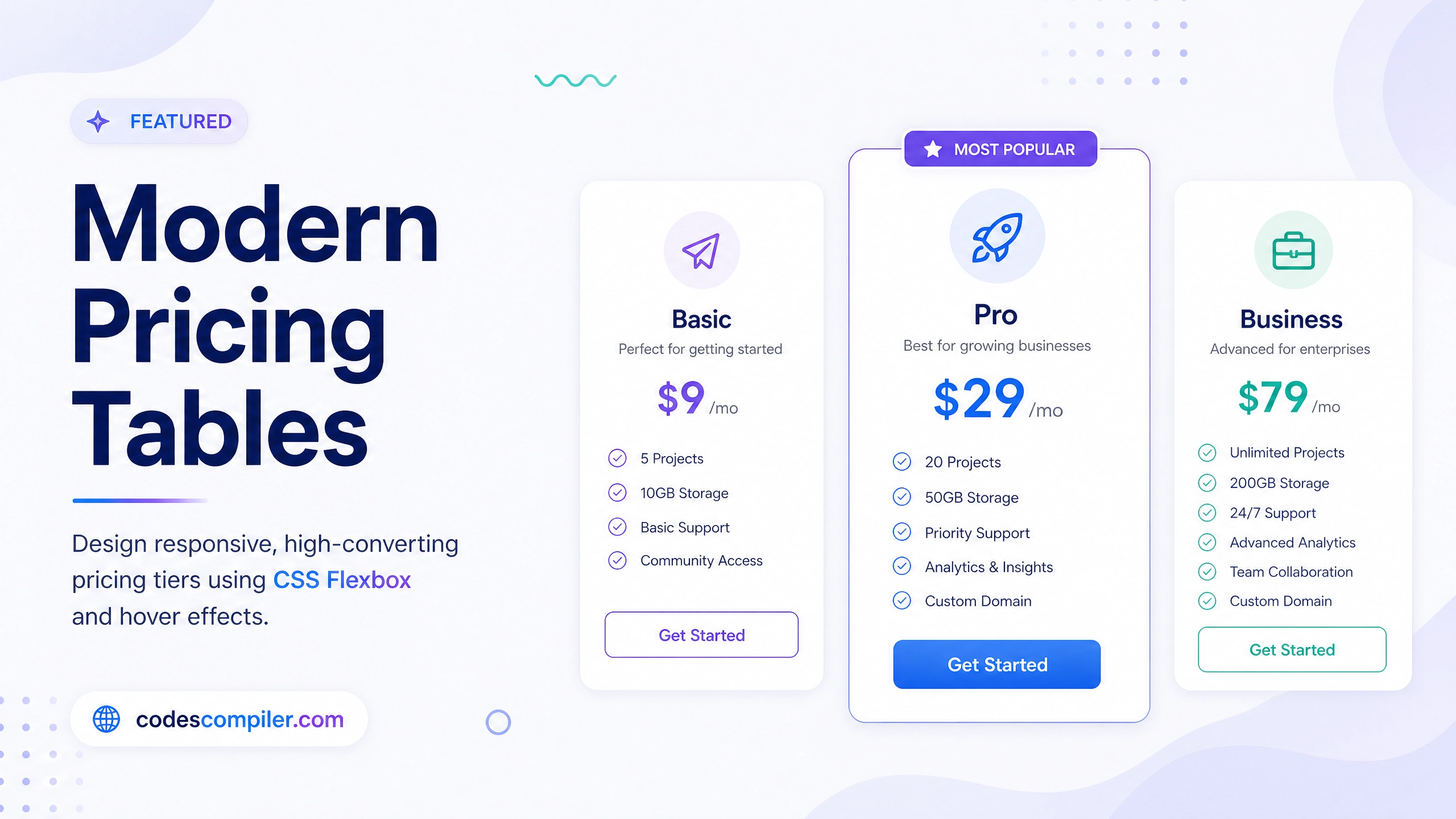
Welcome to this tutorial on building Modern Pricing Table Cards using CSS Flexbox. Pricing tables are a crucial component for SaaS and subscription-based websites. A well-designed pricing section can significantly increase conversion rates.
In this guide, we will create a responsive, 3-tier pricing layout using Flexbox, complete with hover effects and a highlighted “Pro” plan.
The HTML Structure
Our layout consists of a wrapper for the entire section, a header, and a flex container (.pricing-cards) that holds three individual .pricing-card elements. We also add a .pro class to the middle card to style it differently.
<div class="pricing-wrapper">
  <div class="pricing-header">
    <h2>Simple, Transparent Pricing</h2>
    <p>Choose the plan that best fits your needs.</p>
  </div>

  <div class="pricing-cards">
    <!-- Basic Plan -->
    <div class="pricing-card">
      <h3 class="plan-name">Basic</h3>
      <div class="plan-price"><span>$</span>9<span>/mo</span></div>
      <ul class="features-list">
        <li>1 User Account</li>
        <li>10GB Storage</li>
      </ul>
      <button class="btn btn-outline">Get Started</button>
    </div>

    <!-- Pro Plan (Highlighted) -->
    <div class="pricing-card pro">
      <div class="popular-badge">Most Popular</div>
      <h3 class="plan-name">Pro</h3>
      <div class="plan-price"><span>$</span>29<span>/mo</span></div>
      <ul class="features-list">
        <li>5 User Accounts</li>
        <li>100GB Storage</li>
      </ul>
      <button class="btn btn-filled">Get Started</button>
    </div>

    <!-- Enterprise Plan -->
    <div class="pricing-card">
       <!-- Content omitted for brevity -->
    </div>
  </div>
</div>
CSS Styling & Flexbox
The layout relies heavily on Flexbox to align the cards horizontally on desktop and stack them vertically on mobile devices.
1. The Flexbox Container
We use display: flex with flex-wrap: wrap to ensure the cards flow to the next row on smaller screens. justify-content: center keeps the cards centered.
.pricing-cards {
  display: flex;
  justify-content: center;
  align-items: center;
  flex-wrap: wrap;
  gap: 2rem;
}
2. Styling the Individual Cards
Each card is also a flex container (flex-direction: column). This allows us to use flex-grow: 1 on the ul list, which pushes the button perfectly to the bottom of the card, regardless of how many features the list has.
.pricing-card {
  background: white;
  border-radius: 20px;
  padding: 40px 30px;
  width: 320px;
  box-shadow: 0 10px 15px -3px rgba(0, 0, 0, 0.05);
  border: 1px solid #e2e8f0;

  /* Flexbox for internal layout */
  display: flex;
  flex-direction: column;
  transition: transform 0.3s ease, box-shadow 0.3s ease;
  position: relative;
}

.pricing-card:hover {
  transform: translateY(-10px);
  box-shadow: 0 20px 25px -5px rgba(0, 0, 0, 0.1);
}

.features-list {
  list-style: none;
  margin-bottom: 40px;
  flex-grow: 1; /* Pushes the button to the bottom */
  text-align: left;
}
3. Highlighting the Pro Plan
To draw attention to our preferred pricing tier, we scale the middle card up slightly using transform: scale(1.05) and give it a colored border.
.pricing-card.pro {
  border: 2px solid #6366f1;
  transform: scale(1.05);
  box-shadow: 0 20px 25px -5px rgba(99, 102, 241, 0.2);
}

.pricing-card.pro:hover {
  transform: scale(1.05) translateY(-10px);
}

.popular-badge {
  position: absolute;
  top: -15px;
  left: 50%;
  transform: translateX(-50%);
  background: #6366f1;
  color: white;
  padding: 6px 16px;
  border-radius: 20px;
  font-size: 0.85rem;
  font-weight: 700;
  text-transform: uppercase;
}
4. Responsive Design
On screens smaller than 1024px (tablets), we stop scaling the middle card to prevent overlapping. On mobile devices, we let the cards take up 100% of the available width, up to a maximum.
@media (max-width: 1024px) {
  .pricing-cards {
    align-items: stretch;
  }
  .pricing-card.pro {
    transform: scale(1);
  }
  .pricing-card.pro:hover {
    transform: translateY(-10px);
  }
}

@media (max-width: 768px) {
  .pricing-card {
    width: 100%;
    max-width: 400px;
  }
}
By utilizing Flexbox, we achieve a robust, responsive layout with minimal code. Don’t forget to check out the live demo to see the hover effects and responsive behavior in action!